

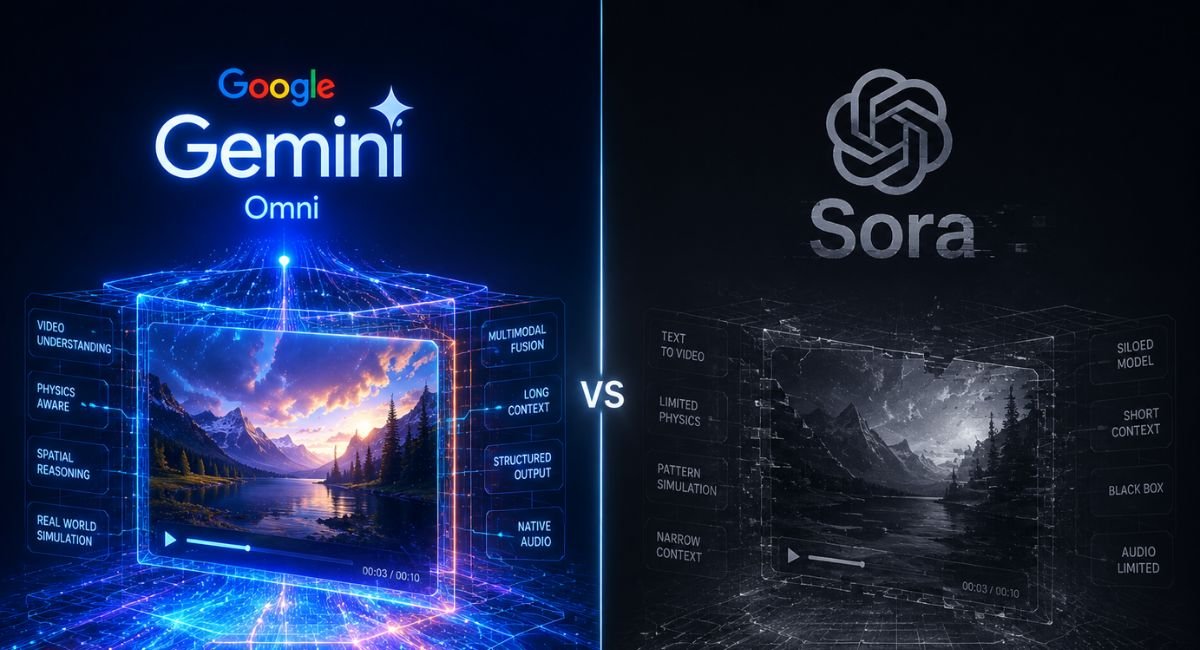
The AI video race feels like Hollywood on caffeine. Every month brings another flashy release. However, Google changed the conversation after unveiling Google Gemini Omni during the Google AI launch 2026 event. This launch pushed the market beyond basic clips and into true conversational AI video editing. Suddenly creators could edit scenes almost like chatting with a human editor.
This detailed Gemini Omni Flash review explains everything in easy English. You’ll learn how the Gemini Omni AI video generator works, where it beats OpenAI Sora, and why many creators now see it as the strongest OpenAI Sora alternative. We also compare pricing, workflows, cinematic quality, and practical creator use cases.
What Is Gemini Omni? Google’s New AI Video Editing Model Explained
Google introduced Gemini Omni Flash as a next-generation multimodal AI video model designed for mixed-input video creation. Unlike old systems that only handled prompts, this tool accepts text, image, audio, and video inputs together. That means creators can combine sketches, voice clips, references, and scripts inside one AI video editing workflow.
The biggest change comes from its conversational editing engine. You don’t need to restart projects repeatedly. Instead, you refine scenes naturally through multi-turn video edits. This approach improves AI video consistency and makes Gemini AI video editing feel closer to real production software than ordinary text to video AI platforms.
| Feature | Gemini Omni Flash | Traditional AI Video Tools |
| Input Types | Text, image, audio, video | Mostly text only |
| Editing Style | Conversational | Prompt reset |
| Audio Support | Native | Limited |
| Workflow | Interactive | One-shot generation |
| Best Use | Professional creators | Quick experiments |
Gemini Omni vs OpenAI Sora — Side-by-Side AI Video Comparison for 2026
Google’s Gemini Omni Flash has ignited a fierce battle in the world of AI video editing tools 2026. After the massive Google I/O 2026 AI announcements, creators started comparing this new Google AI video model directly against OpenAI Sora. Unlike older systems, Gemini Omni supports conversational editing, multimodal prompts, and advanced cinematic controls inside one workflow. That means users can combine text, images, audio, and reference clips without rebuilding projects repeatedly.
Many creators now believe the platform could become the strongest OpenAI Sora alternative for professional content production. In this guide, you’ll discover performance tests, pricing insights, editing features, workflow advantages, and whether Gemini Omni truly leads the future of AI-powered filmmaking. (The Verge)
| Category | Gemini Omni Flash | OpenAI Sora |
| Editing Style | Interactive | Prompt-first |
| Audio | Built-in | Limited rollout |
| Scene Revision | Excellent | Moderate |
| Typography Accuracy | Improving | Better |
| Workflow Speed | Faster | Slower |
| Best For | Teams & creators | Cinematic clips |
Latest Gemini Omni Updates in 2026 You Should Know Before Using It
Following the Google I/O 2026 AI announcements, Google expanded the Gemini ecosystem aggressively. The platform now connects with YouTube Shorts AI tools, YouTube Create AI, and future enterprise API access systems. Businesses exploring AI-powered communication systems alongside video automation can also see how AI voice agents are evolving in this detailed PollyReach platform breakdown. These updates transformed Omni from a demo into a real AI video generation platform.
Another major update improved AI camera motion generation and AI-generated camera movement. Creators can now build scenes using commands like camera orbit shot or dolly zoom prompt with smoother motion output. Google also improved AI audio synchronized video generation which helps social media creators publish clips without third-party editing software.
Best AI Video Editing Tools in 2026 Besides Gemini Omni and Sora
Even though Gemini Omni vs Veo comparisons dominate headlines, several rivals still matter. PixVerse V6 remains popular because it offers strong accessibility and flexible templates. Meanwhile Runway and Kling continue pushing advanced AI video generation for marketers and indie filmmakers.
The broader market of best AI video generators now includes specialized tools for ads, storytelling, and motion design. Some platforms focus on cinematic realism. Others prioritize automation. This diversity matters because creators rarely use only one tool inside a modern AI production pipeline.
| Tool | Main Strength | Best Users |
| Gemini Omni Flash | Conversational editing | Agencies |
| Sora | Cinematic realism | Filmmakers |
| PixVerse V6 | Fast social clips | TikTok creators |
| Runway | Editing workflows | Studios |
| Kling AI | Motion realism | Advertisers |
Gemini Omni Pricing Review — Free vs Paid Plans Compared
The current Gemini Omni pricing structure depends on access tier and rollout region. Some creators receive free experimental access through Google services. However professional users will likely need subscription plans once the AI video editing API launches publicly.
Compared with many free vs paid AI video tools, Omni appears designed for long-term creator monetization. This makes sense because rendering high-resolution video output with native audio generation consumes heavy computing resources. Enterprise plans will likely target studios needing scalable AI automation software and cloud-based workflows.
| Plan Type | Expected Features |
| Free Access | Limited rendering |
| Creator Plan | Faster generations |
| Pro Plan | Advanced editing |
| Enterprise | API and automation |
Real Use Cases — Who Should Actually Use Gemini Omni?
The strongest audience for AI-powered video production includes YouTubers, agencies, educators, and ecommerce brands. Many creators now use Omni as an AI social media video maker because it handles revisions quickly. A marketer can replace scenes or objects without rebuilding an entire project.
Educational creators also benefit heavily. Omni performs surprisingly well in AI educational video creation and AI explainer video generator tasks. During benchmark tests, the system generated a simple quantum computing explainer using paper-style visuals that felt visually clear and engaging.
“AI video tools are no longer toys. They’re becoming collaborative production partners.”
Gemini Omni Prompt Guide — How to Create Cinematic AI Videos Faster
Strong prompts matter enormously in AI prompt engineering. The best creators treat prompts like miniature movie scripts. Instead of typing “cool city scene,” they describe lighting, motion, sound, and framing carefully. This improves AI-generated cinematic scenes and boosts prompt adherence significantly.
Creators should also use cinematic language like shallow depth of field, photorealistic product ad, or AI scene atmosphere instructions. Google’s own examples showed stronger results when prompts controlled movement and visual mood together. This approach improves cinematic AI video creation while reducing strange rendering mistakes.
| Weak Prompt | Strong Prompt |
| Create city video | Neon rainy street with cinematic reflections |
| Show product | Luxury watch under warm studio light |
| Create tutorial | Minimal desk setup with clean motion graphics |
Gemini Omni Pros & Cons After Testing It for AI Video Editing
The biggest advantage of Google AI video model technology lies in workflow flexibility. Omni excels at AI visual storytelling, iterative revisions, and cinematic atmosphere. It also performs strongly in AI storytelling software use cases where creators need multiple creative passes quickly.
Still, the platform has weaknesses. AI typography rendering remains inconsistent in several tests. Some creators also reported AI text rendering issues during social video production. While the visuals often look beautiful, exact lettering still needs manual review before publishing commercial content.
| Pros | Cons |
| Conversational workflow | Weak text rendering |
| Mixed media support | Limited API access |
| Native audio | Rollout restrictions |
| Cinematic visuals | Heavy GPU demand |
Is Gemini Omni Better Than OpenAI Sora for Professional AI Video Editing?
For professional teams, the answer depends on workflow goals. Studios focused on pure cinematic realism may still prefer Sora. However creators managing clients, revisions, and fast campaigns will likely choose Omni because its AI workflow optimization feels dramatically faster.
This distinction matters in the growing AI creator economy. Agencies now need scalable AI workflow automation tools that reduce editing hours. Omni’s conversational structure supports rapid experimentation. That advantage makes it attractive for brands producing AI-generated social videos and AI-generated product demo videos weekly.
Final Verdict — Should You Switch from Sora to Gemini Omni in 2026?
Right now, Gemini Omni Flash looks like one of the smartest AI productivity tools for creators released this decade. Google combined AI media generation, conversational workflows, and multimodal inputs into a single ecosystem. The result feels less robotic and more collaborative.
If you want a modern AI video automation platform for content marketing, education, or social media production, Omni deserves serious attention. While Sora still delivers impressive cinematic moments, Google currently leads in workflow design, creator flexibility, and scalable AI automation for marketers across modern video pipelines.
FAQs
Is Google Gemini better than OpenAI?
Google Gemini and OpenAI tools serve different purposes. Google Gemini Omni performs strongly in conversational AI video editing, multimodal workflows, and ecosystem integration. Meanwhile, OpenAI still leads several creative benchmarks through OpenAI Sora and advanced reasoning models. If you need flexible AI video workflow tools for creators, Gemini currently feels faster and more collaborative.
What are the disadvantages of Gemini AI?
Despite impressive upgrades, Gemini still struggles with AI typography rendering, exact text placement, and some complex motion scenes. Certain creators also reported occasional AI video consistency problems during long cinematic clips. In enterprise production, rollout limitations and delayed API availability may slow adoption for advanced studios and agencies.
What is the Gemini app good for?
The Gemini app works well for productivity, research, content generation, and AI-powered video production tasks. It also helps creators build scripts, prompts, and visuals quickly. Many marketers now use Gemini alongside AI content creation tools and AI social media video maker platforms to speed up content publishing across YouTube, TikTok, and Instagram.
Is Gemini safe to use?
Google includes security layers, moderation systems, and account protections inside the Gemini ecosystem. However, users should still avoid uploading confidential business files or sensitive personal information into any AI video generation platform. Like most modern AI systems, human review remains important before publishing commercial or client-facing content.
Does Gemini collect your data?
Yes, Google may collect prompts, interactions, and usage signals to improve services and system performance. Data policies can vary depending on region, account settings, and subscription type. Before using AI SaaS video tools or enterprise features, always review Google’s official privacy documentation and workspace security controls carefully.

Welcome to Corexity! I’m Zain Bhatti, an AI-Powered SEO Strategist with 3 years of experience. I help you master the latest AI tools and rank higher with simplified, high-impact content strategies. Let’s grow together!