

Developers are racing toward smarter automation in 2026, and the battle between Kilo Code OSS and Cursor AI sits right at the center of that shift. Both platforms promise faster coding, cleaner workflows, and advanced AI assistance, yet they approach software development in completely different ways. This detailed Kilo Code OSS review explores how these tools perform in real coding environments, from automation speed to flexibility and pricing. While Cursor focuses on a polished experience, Kilo attracts developers who want deeper control and customizable workflows.
If you’re searching for the best AI coding assistant 2026, this guide breaks down everything you need to know about features, performance, and the growing world of open-source AI coding tools.
What Is Kilo Code OSS? Why Developers Are Suddenly Switching From Cursor AI
Kilo Code OSS is an open-source AI coding platform designed for developers who want maximum control over their coding environment. Unlike Cursor AI, which works as a standalone AI editor, Kilo functions as a powerful VS Code extension that connects directly to different AI providers. Many developers now call it one of the most promising open-source AI coding tools because it combines flexibility with aggressive automation.
The biggest reason developers are switching involves freedom and customization. Kilo supports OpenAI-compatible APIs, local models, advanced terminal actions, and autonomous workflows. In contrast, Cursor AI delivers a smoother beginner experience through its polished infrastructure. Still, advanced programmers prefer Kilo because it supports AI coding tools with API keys, self-hosted AI coding tools, and highly customizable AI-powered VS Code workflows without locking users into one vendor ecosystem.
| Feature | Kilo Code OSS | Cursor AI |
| Platform Type | VS Code extension | Standalone editor |
| Source Model | Open source | Proprietary |
| AI Flexibility | Very high | Moderate |
| Local LLM Support | Yes | Limited |
| Setup Difficulty | Medium | Easy |
| Best For | Advanced users | Beginners & teams |
Kilo Code OSS vs Cursor AI — Quick Comparison Table for 2026
The 2026 battle between these tools feels like Linux versus macOS all over again. One side prioritizes control while the other prioritizes convenience. This AI code editor comparison shows how both platforms target different types of developers. Kilo focuses on autonomy and extensibility. Meanwhile, Cursor focuses on polished onboarding and stable workflows.
Many programmers searching for the best AI coding assistant 2026 want faster coding without configuration headaches. Cursor wins in simplicity because its managed infrastructure handles everything automatically. However, Kilo dominates in raw flexibility thanks to its support for AI coding customization, AI coding infrastructure, and advanced AI model selection workflows.
| Category | Kilo Code OSS | Cursor AI |
| AI Workflow | Autonomous | Guided |
| Customization | Extensive | Limited |
| Pricing Style | API usage billing | Subscription |
| AI Models | User-selected | Managed |
| Team Features | Limited | Strong |
| Enterprise Security | Community driven | Enterprise ready |
| Ease of Use | Moderate | Beginner friendly |
The Biggest Kilo Code OSS Updates in 2026 You Should Know About
The latest Kilo updates transformed the platform from a niche developer experiment into a serious contender among AI software engineering tools. The new autonomous workflow engine now chains tasks together automatically. It creates files, edits repositories, debugs issues, and runs shell commands with minimal supervision. This upgrade pushed Kilo into the category of true autonomous coding agents similar to the new generation of AI workflow systems now appearing across the broader AI automation industry.
Another major update involves support for Claude-powered coding tools, Gemini integrations, and advanced GPT-5 coding assistant workflows. Developers can now combine multiple models inside one session for better reasoning and debugging accuracy. That capability dramatically improves AI coding performance comparison scores against several premium competitors. Furthermore, Kilo now handles massive repositories more smoothly thanks to better memory indexing and optimized AI context window management.
“Kilo feels less like autocomplete and more like an autonomous junior engineer.” — Independent GitHub contributor
Cursor AI Review 2026 — Where It Still Beats Kilo Code
This updated Cursor AI review shows why the platform remains one of the strongest premium coding assistants available today. Cursor delivers one of the cleanest onboarding experiences in the AI coding market. Installation feels effortless. Everything works immediately. That simplicity matters because many developers don’t want to configure APIs, models, and infrastructure manually.
Cursor also performs better in daily reliability tests. Its integrated architecture improves speed, autocomplete consistency, and interface responsiveness. The famous Cursor Composer system remains one of the most polished examples of guided agentic AI workflows available today. Developers who value stability over customization often choose Cursor because it reduces friction during high-pressure client projects and production deployments.
| Cursor AI Strengths | Why It Matters |
| Faster onboarding | Easier for beginners |
| Stable releases | Better production reliability |
| Guided AI flows | Fewer workflow mistakes |
| Strong documentation | Faster learning curve |
| Team management | Better enterprise adoption |
Best AI Coding Tools in 2026: Kilo Code vs Cursor vs Cline vs Windsurf
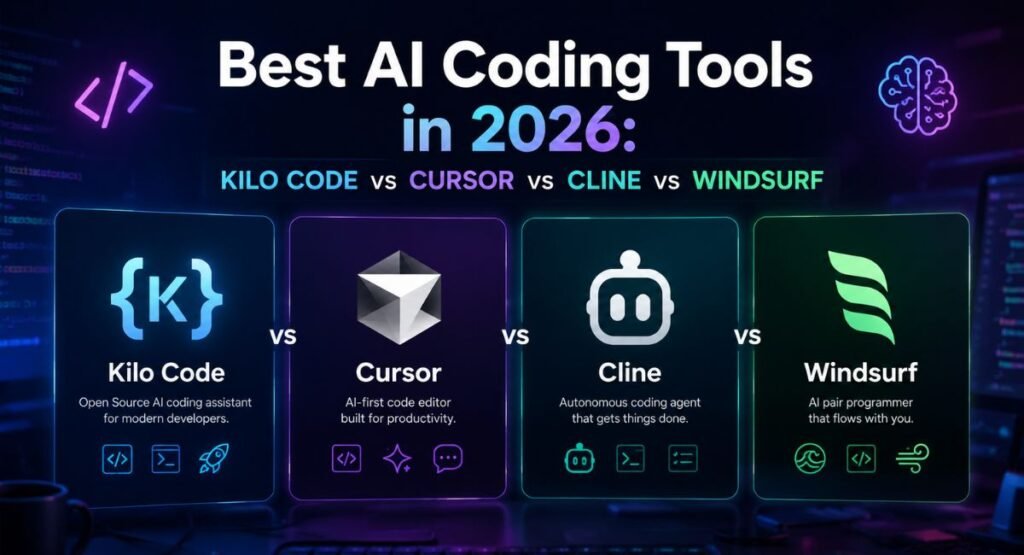
The AI coding market exploded during 2026. Developers now compare tools the same way gamers compare GPUs. Each platform offers different strengths. Kilo excels in flexibility. Cursor dominates polish. Cline focuses heavily on transparency while Windsurf emphasizes aggressive workflow automation. This broader AI coding tool comparison helps developers understand where each product fits.
Among all modern AI programming copilots, Kilo stands out because it behaves more like an infrastructure layer than a simple assistant. It supports advanced developer workflow automation, local models, and customizable execution chains. Meanwhile, Cursor remains one of the strongest AI coding SaaS platform choices for startups needing reliable workflows without configuration complexity. Developers searching for Cursor AI alternatives often end up testing Kilo first because both tools share similar audiences.
| Tool | Best Use Case |
| Kilo Code OSS | Advanced automation |
| Cursor AI | Professional productivity |
| Cline | Open-source transparency |
| Windsurf | Fast automation workflows |
Free vs Paid — Is Kilo Code OSS Actually Cheaper Than Cursor AI?
At first glance, Kilo appears dramatically cheaper because the software itself is free. However, the real costs come from model usage. Heavy workflows can consume significant API credits. Developers using Claude or GPT-5 intensively may eventually spend more than Cursor’s monthly subscription. This makes AI coding assistant pricing one of the most misunderstood topics in the market.
Cursor simplifies budgeting through predictable subscriptions. Kilo offers flexibility through usage-based billing. Therefore, light users often save money with Kilo while heavy teams usually prefer Cursor’s stable costs. Developers building internal tools or hobby projects frequently choose Kilo because they can control spending carefully through BYOK AI tools and selective model routing.
| Pricing Factor | Kilo Code OSS | Cursor AI |
| Base Cost | Free | Paid subscription |
| API Costs | Variable | Included |
| Budget Predictability | Low | High |
| Enterprise Features | Limited | Advanced |
| Scaling Cost | Can rise fast | More stable |
Real Developer Use Cases — When Kilo Code OSS Wins (And When It Doesn’t)
Kilo shines during complex automation tasks. For example, developers building SaaS applications often use it for multi-step repository changes, backend refactoring, and infrastructure scripting. The platform handles multi-file AI code editing, shell execution, and advanced automation surprisingly well. These capabilities make it one of the strongest AI DevOps automation tools available for advanced technical users.
However, Kilo can occasionally overshoot instructions during large automation loops. Cursor feels safer in production because its confirmation-driven approach prevents catastrophic mistakes. Teams handling sensitive deployments or client repositories often prefer Cursor because it delivers stronger AI coding reliability and more mature enterprise AI security features.
Case Study: Startup Workflow Automation
A small SaaS startup replaced repetitive deployment tasks with Kilo automation chains. Their engineering team reduced manual debugging time by nearly 35%. However, they still used Cursor for customer-facing production updates because its guided review system reduced deployment risks.
Pros & Cons of Kilo Code OSS After Testing It for 30 Days
After one month of heavy testing, Kilo impressed us with its raw automation power. It handled advanced coding sequences faster than several commercial rivals. The support for locally hosted LLMs, terminal chaining, and open infrastructure makes it a dream tool for technical power users. It also integrates naturally into existing AI coding workflow setups without forcing developers into a completely new editor.
Still, the platform demands patience. Beginners may struggle with setup complexity, API management, and debugging workflows. Unlike Cursor, Kilo lacks enterprise polish and predictable onboarding. Its community grows rapidly, yet the ecosystem still feels younger than larger competitors. Even so, this open-source Cursor AI alternative remains one of the most exciting experiments in modern AI-assisted programming.
| Pros | Cons |
| Open source | Steeper learning curve |
| Strong automation | Variable stability |
| Local model support | Smaller ecosystem |
| Deep customization | Harder onboarding |
| Flexible AI routing | Requires API setup |
Should Beginners Use Kilo Code OSS or Cursor AI in 2026?

Beginners usually adapt faster to Cursor. The interface feels cleaner. Documentation remains stronger. Most importantly, developers can start coding immediately without touching infrastructure settings. That convenience dramatically improves the overall AI coding onboarding experience. Cursor also performs better for users exploring AI coding tools for beginners for the first time.
Kilo targets developers who enjoy experimentation and customization. If you already understand APIs, infrastructure, and model optimization, Kilo offers incredible flexibility. Advanced engineers building custom pipelines or privacy-focused systems often choose Kilo because it supports local LLM coding tools, advanced AI workflow orchestration, and customizable AI-assisted terminal workflows far beyond what most competitors allow.
Final Verdict — Is Kilo Code OSS Better Than Cursor AI in 2026?
The answer depends entirely on your workflow. If you want simplicity, stability, and fast onboarding, Cursor remains the safer option. It delivers a polished experience with fewer technical hurdles. That makes it one of the strongest AI coding subscription tools for teams, agencies, and production-focused developers.
However, developers who prioritize freedom, infrastructure control, and aggressive automation may prefer Kilo Code OSS. Its support for local models, API flexibility, and deep automation workflows gives it enormous long-term potential. This final Kilo Code OSS review confirms one thing clearly: the future of coding belongs to intelligent automation platforms capable of far more than autocomplete.
FAQs
Is Kilo Code better than Cursor?
Kilo Code OSS is better for developers who want flexibility, local model support, and advanced automation. It gives users more control over APIs, workflows, and infrastructure. However, Cursor AI feels smoother for beginners because it offers a polished interface, guided workflows, and easier onboarding. The better option depends on whether you value customization or simplicity.
What is the best AI coding tool in 2026?
The best AI coding assistant 2026 depends on your workflow and experience level. Cursor AI remains popular for professional teams and startups because of its reliability and strong user experience. Meanwhile, Kilo Code OSS stands out among open-source AI coding tools thanks to its automation features, model flexibility, and deep VS Code integration.
What AI is better than Cursor AI?
Several strong Cursor AI alternatives exist in 2026. Kilo Code OSS offers more customization and local model support. Windsurf focuses on rapid automation workflows, while Cline attracts developers who prefer transparency and open-source ecosystems. GitHub Copilot also remains a strong option for developers who want lightweight AI assistance inside familiar coding environments.
What is the best code editor in 2026?
The best editor depends on your development style. Cursor AI works well for users who want an all-in-one AI-powered code editor with built-in AI features. VS Code still dominates because of its extension ecosystem and flexibility. Many advanced developers now combine VS Code with AI coding extension for VS Code tools like Kilo Code OSS for maximum productivity.
Is it worth learning to code in 2026 with AI?
Yes, learning to code in 2026 still offers huge value. AI can automate repetitive tasks, but companies still need developers who understand logic, architecture, debugging, and product thinking. Modern programmers now work alongside AI developer tools instead of competing against them. Developers who understand both coding and AI workflows will likely have stronger career opportunities in the coming years.

Welcome to Corexity! I’m Zain Bhatti, an AI-Powered SEO Strategist with 3 years of experience. I help you master the latest AI tools and rank higher with simplified, high-impact content strategies. Let’s grow together!